

Get set up
Join your team
Join your coach's team with a link, an invitation or a team code.
Your coach can invite you in three ways. Pick the one that matches what you received.
This is usually a link in a group chat.
- Open the link. You’ll see the team’s name and your coach’s name.
- Choose Create account, or I already have an account.
- Follow the steps. Everstride remembers which team you’re joining.
- Choose what your coach can see.
- Open the email and follow the link.
- Check your name, then choose a password of at least 12 characters.
- Choose what your coach can see.
If you already have an account, sign in and you’ll find the invitation waiting for you. Invitations last 14 days. If yours has expired, ask your coach to send a new one.
A code looks like ABCDE-12345.
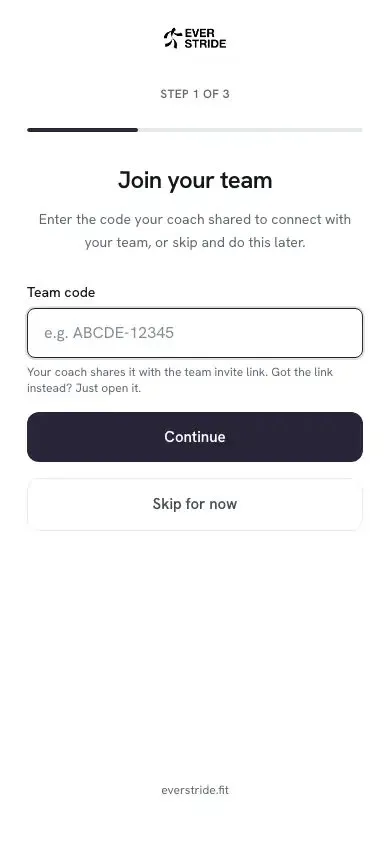
- During setup, enter the code on the Join your team step. If you’ve already finished setup, open Teams and use Join with a code.
- Check the team and coach are the ones you expected.
- Choose what your coach can see.
Choose what your coach sees
Section titled “Choose what your coach sees”Before you join, Everstride shows you who the coach is and asks what they can see. Nothing is shared until you join.
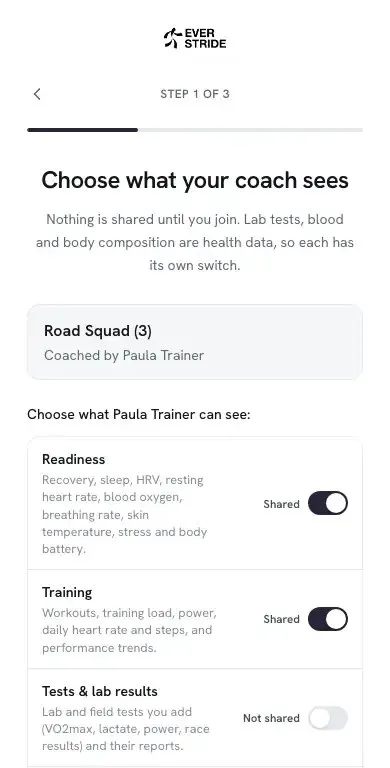
There are four switches: Readiness, Training, Tests & lab results, and Blood & body composition. Set them how you like, then choose Join team.
You can change these at any time. See exactly what each switch covers.
No team yet?
Section titled “No team yet?”That’s fine. Choose Skip for now during setup. You can still connect a device and use Today by yourself, and join a team whenever you’re ready.
If it doesn’t work
Section titled “If it doesn’t work”| What you see | What to do |
|---|---|
| “This link is no longer valid” | Your coach may have changed the link. Ask them for the new one. |
| “We could not find that team” | Check the code for typos, or ask your coach for it again. |
| The team is full | Your coach has reached their athlete limit. Let them know. |
| “You are already on this team” | You’re all set. Open Teams to see it. |
| “You already have an account” | Sign in with that email address instead. |